MoneyPrinterTurbo
概览
- Github: MoneyPrinterTurbo
一款利用AI大模型,一鍵生成高質量短視頻的工具
只需提供一个视频 主题 或 关键词 ,就可以全自动生成视频文案、视频素材、视频字幕、视频背景音乐,然后合成一个高清的短视频。
webui界面
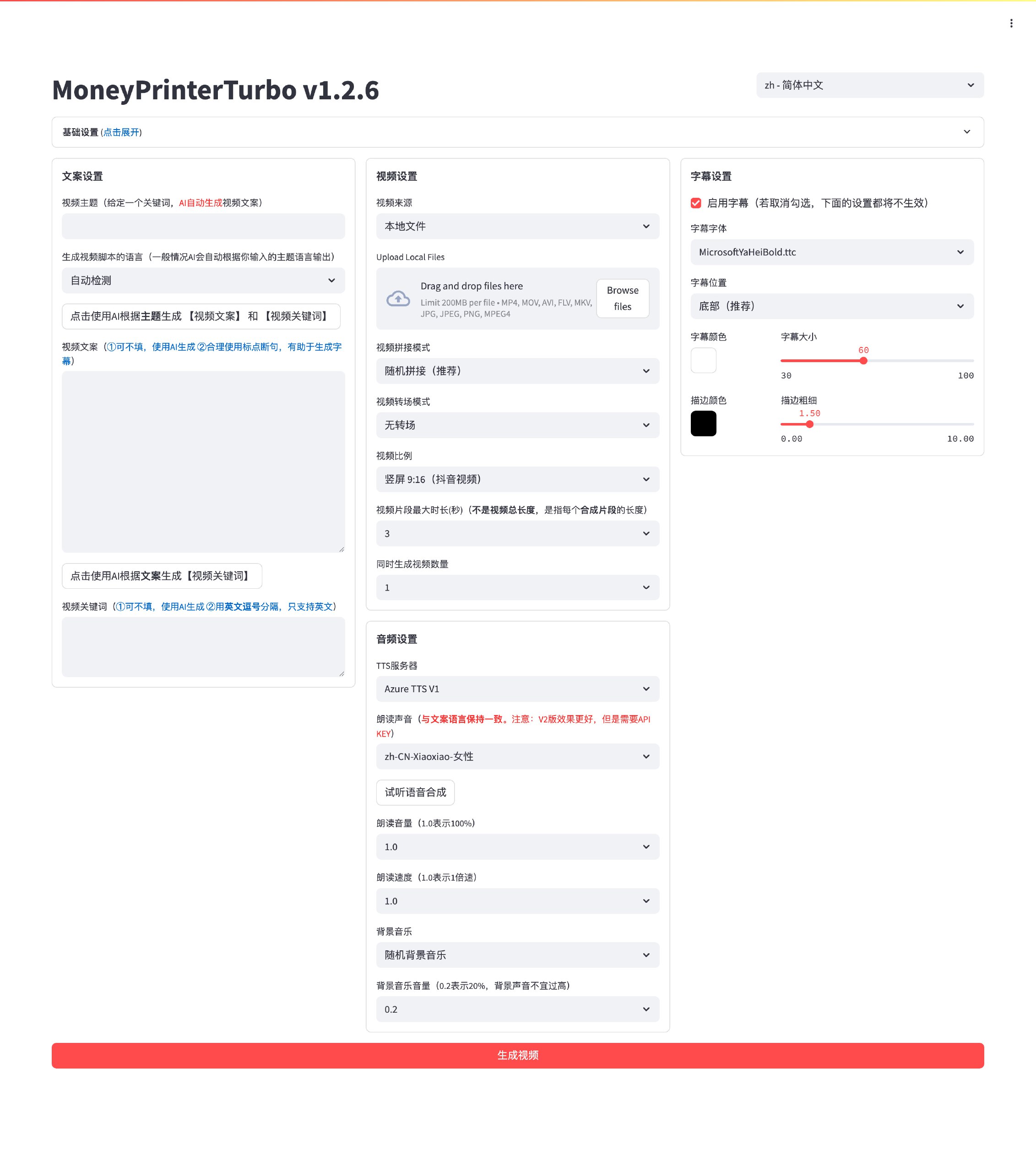
视频示例 📺
如视频加载缓慢,请耐心等待
横屏 16:9
▶️ 《为什么要运动》
竖屏 9:16
▶️ 《如何增加生活的乐趣》
快速开始 🚀
MoneyPrinterTurbo官方安装教程
下载一键启动包,解压直接使用(路径不要有 中文、特殊字符、空格)
- 百度网盘(v1.2.6): https://pan.baidu.com/s/1wg0UaIyXpO3SqIpaq790SQ?pwd=sbqx 提取码: sbqx
- Google Drive (v1.2.6): https://drive.google.com/file/d/1HsbzfT7XunkrCrHw5ncUjFX8XX4zAuUh/view?usp=sharing
下载后,建议先双击执行 update.bat 更新到最新代码,然后双击 start.bat 启动
启动后,会自动打开浏览器(如果打开是空白,建议换成 Chrome 或者 Edge 打开)
手动部署过程较为复杂,请回到概览,并打开 MoneyPrinterTurbo 的 GitHub 仓库进行查看
下载后,建议先双击执行 update.bat 更新到最新代码,然后双击 start.bat 启动
启动后,会自动打开浏览器(如果打开是空白,建议换成 Chrome 或者 Edge 打开)
如果你的电脑有 GPU 可以参考 如何修改视频编码器 部分,使用 GPU 加速视频编码,速度会快很多
开始使用
基本配置
- 配置Pexels API Key 点击获取
如果你已完成配置,可以跳过此步骤
点击展开 Pexels API Key 注册教程
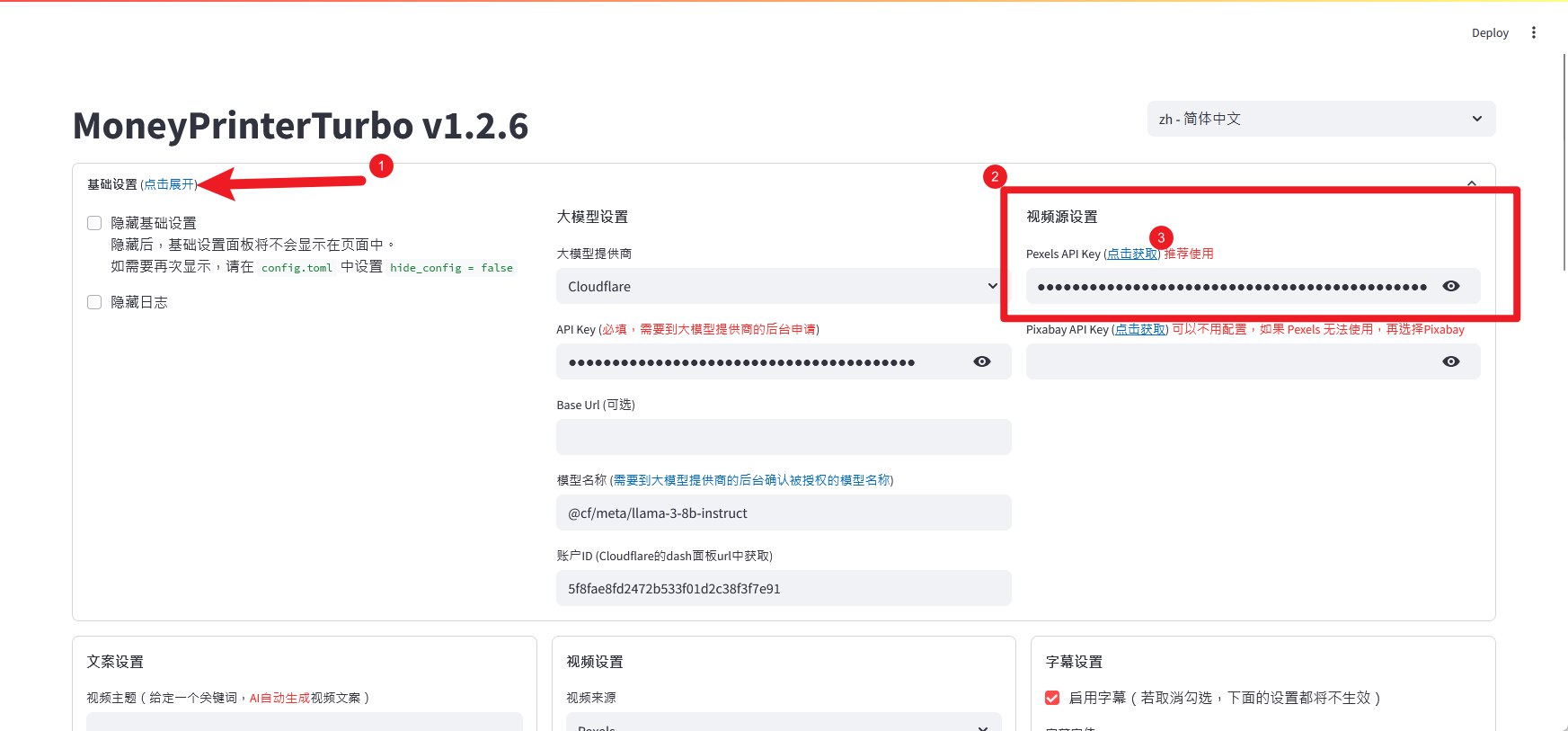
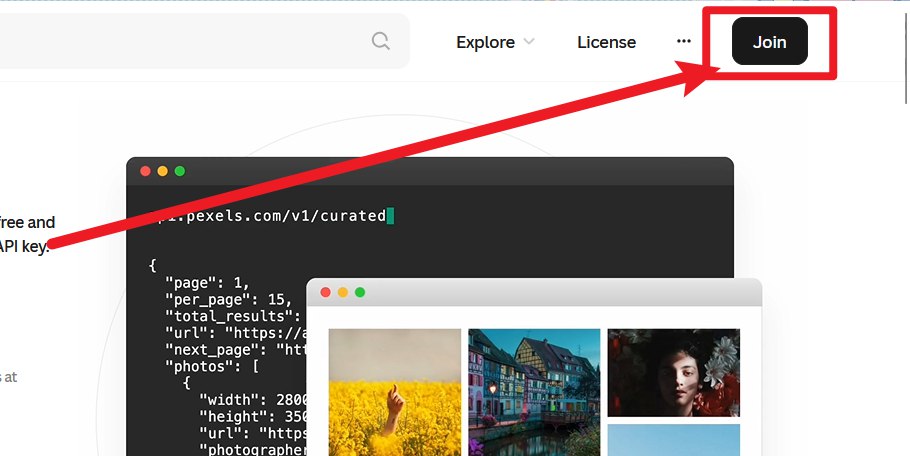
注册账号





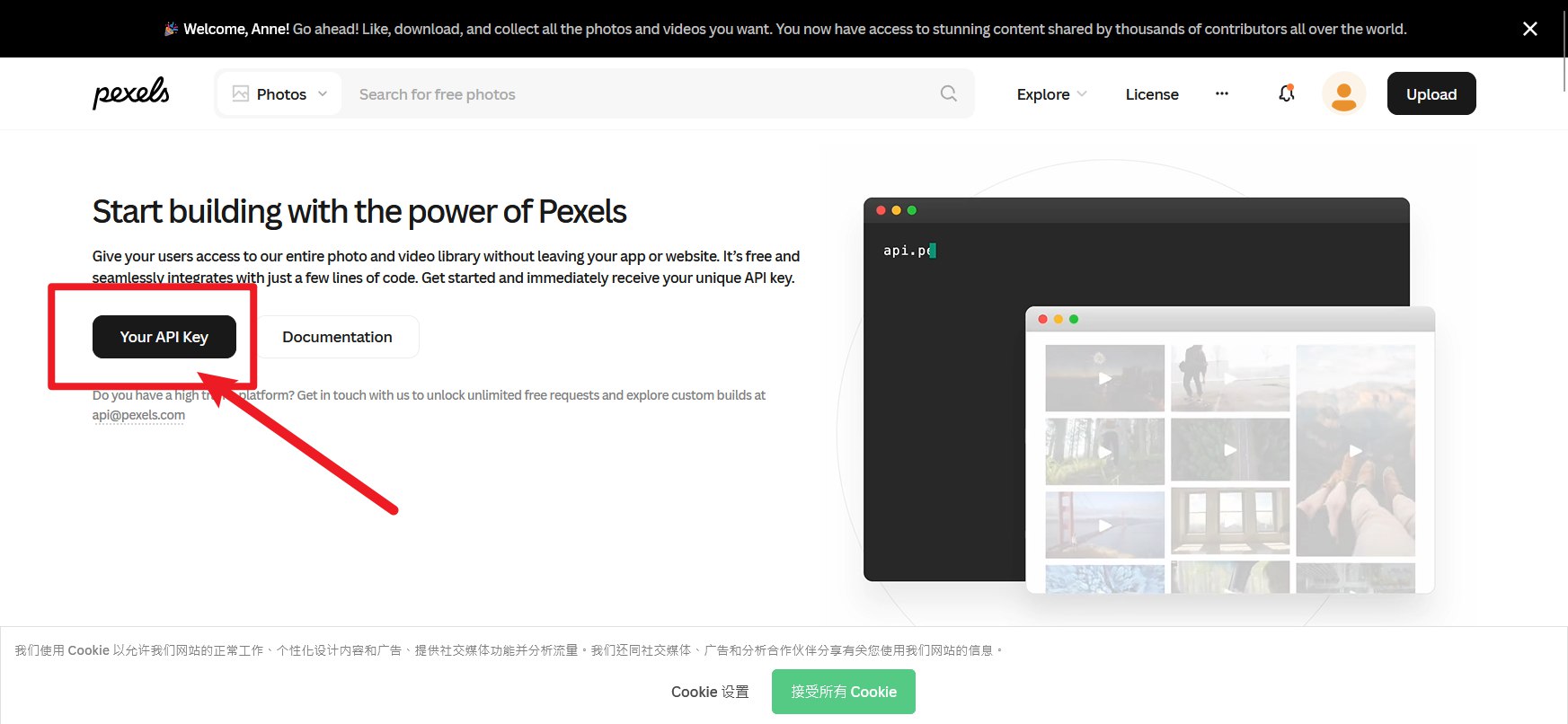
回到 api 获取页面点击跳转

申请理由:
I plan to use Pexels videos for AI-powered secondary creation. Specifically, I will use them as base footage to train and generate novel video content using generative AI models (such as Style Transfer or GANs). The original videos will be integrated by using their visual data (texture, motion, composition) as input sources for the AI to learn from and transform. The final AI-generated output will be shared across my social media channels and potentially in educational presentations, clearly adhering to Pexels' licensing requirements for attribution and non-commercial/appropriate commercial use.
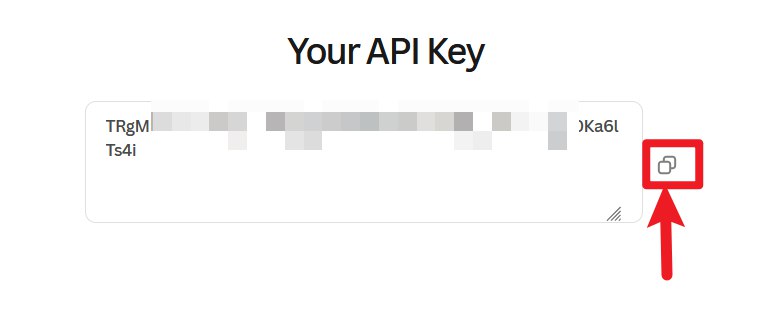
获得 API Key 后,回到 MoneyPrinterTurbo 的配置页面,在 Pexels API Key 粘贴获得的 API Key

- 配置 AI API Key
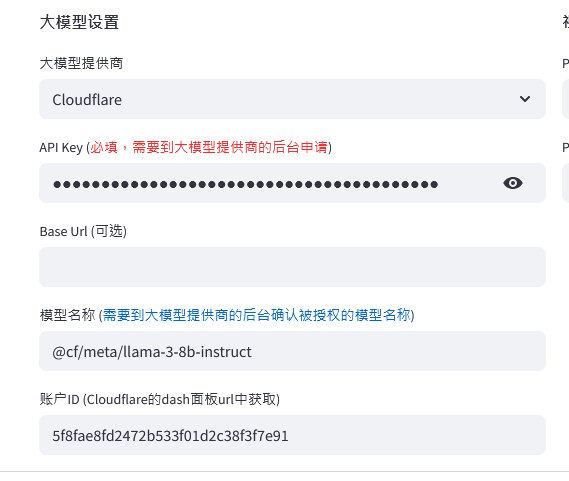
如果您不知到什么是大模型 API Key,可以跳过此步骤,直接使用 AI Chat,例如:豆包、deepseek等
这里不配置 AI大模型 ApiKey 直接使用 豆包 作为示例
生成视频
- 确定视频主题
如:如何增加生活的乐趣
- 与 豆包 进行对话,生成【文案】和【关键词】
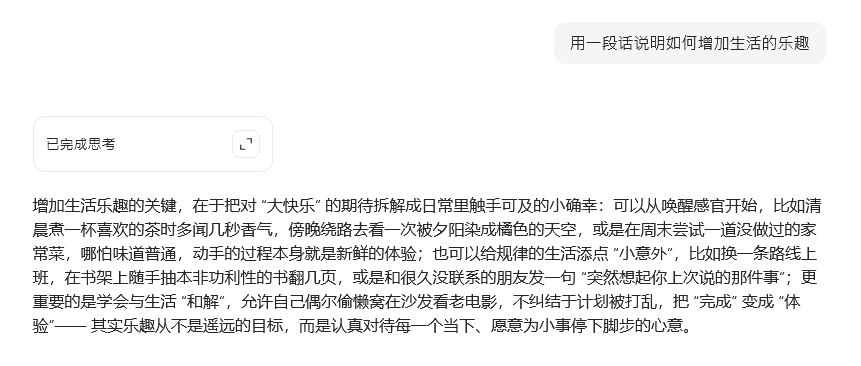
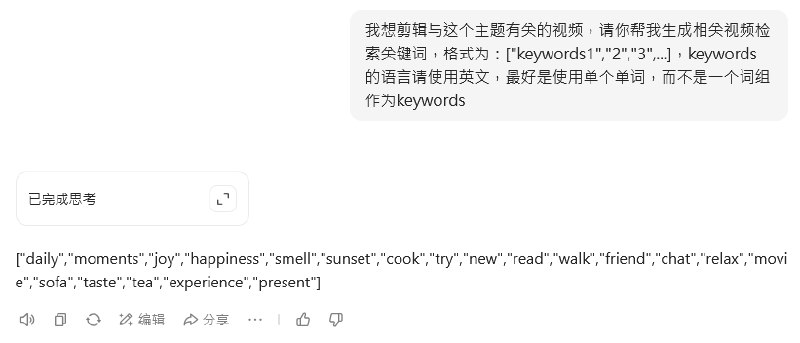
相关提示词:
用一段话说明如何增加生活的乐趣
我想剪辑与这个主题有关的视频,请你帮我生成相关视频检索关键词,格式为:keywords1,2,3,...,keywords的语言请使用英文
- 在 MoneyPrinterTurbo 中完成相关内容填写
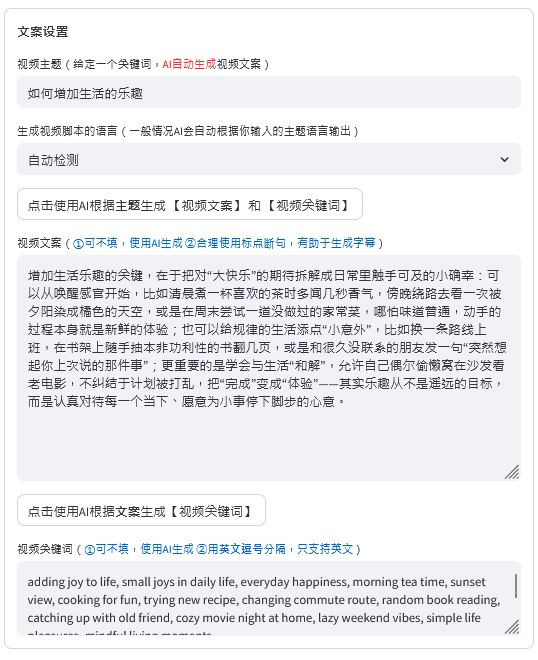
其他内容根据自己的喜好进行设置即可
- 点击 生成视频 按钮,耐心等待视频生成完成
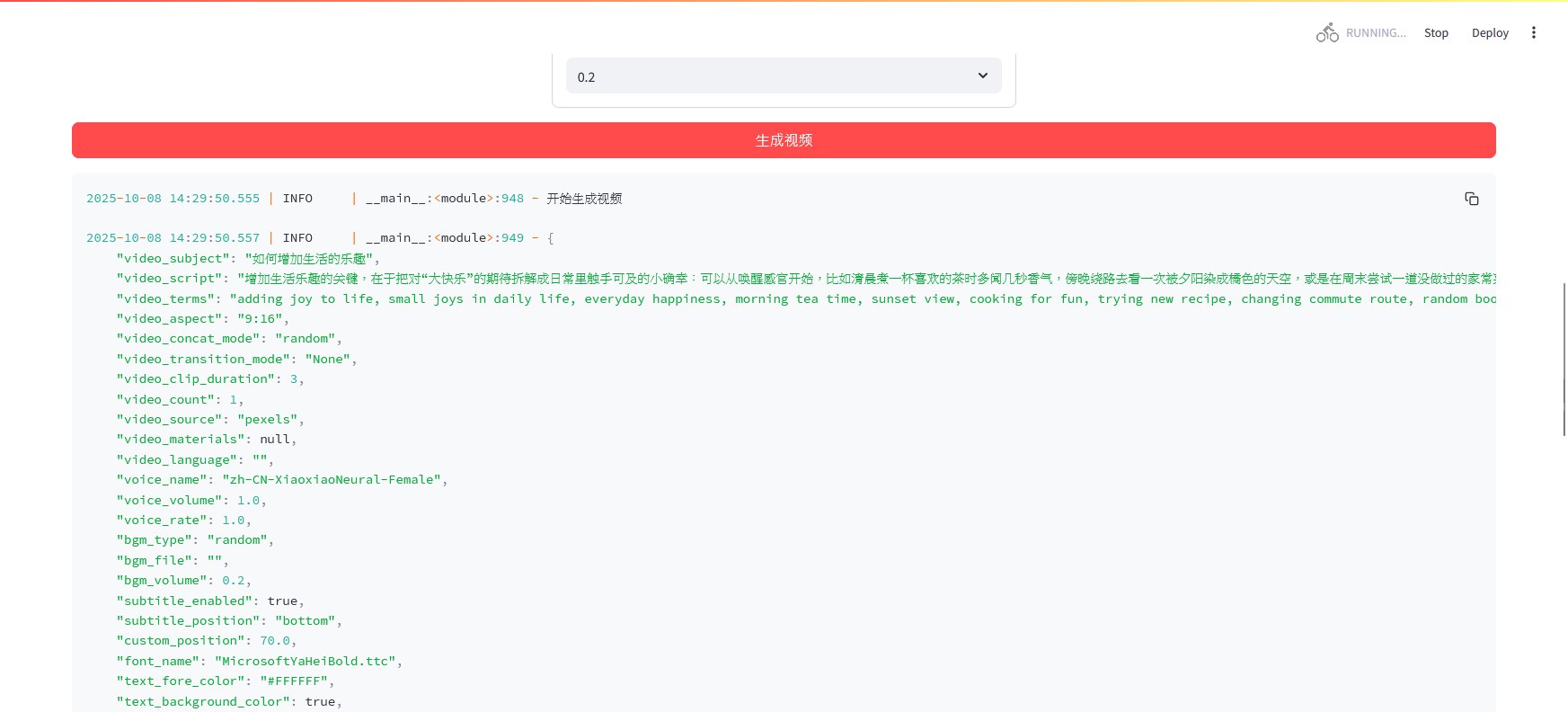
生成结果展示
如何修改视频编码器
视频默认使用 libx264 编码器进行编码,使用 CPU 进行编码,速度较慢,如果你的电脑有 NVIDIA GPU,可以修改为 h264_nvenc 编码器,使用 GPU 进行编码,速度会快很多
请务必使用 ffmpeg 命令查看计算机支持的编码器,确保计算机支持你所替换的编码器,否则可能会导致生成视频失败
nvenc为 NVIDIA GPU 编码器
本教程只针对 NVIDIA GPU 进行演示,其他品牌 GPU 请查看末尾的说明
查看支持的编码器
- 解压完成后,打开
MoneyPrinterTurbo-Portable-Windows-1.2.6文件夹
ffmpeg.exe 的位置如图所示:
MoneyPrinterTurbo-Portable-Windows-1.2.6
  ├─ Lib
  │   └─ ffmpeg
  │         └─ ffmpeg-7.0-essentials_build
  │                                    └─ ffmpeg.exe
- 在有
ffmpeg.exe的文件夹内,按住Shift键并右键单击空白处,选择 在此处打开 PowerShell 窗口(或 在此处打开命令窗口)
点击展开查看示例输出内容
Windows PowerShell
Copyright (C) Microsoft Corporation. All rights reserved.

Install the latest PowerShell for new features and improvements! https://aka.ms/PSWindows

PS C:\Users\Miku\Downloads\MoneyPrinterTurbo-Portable-Windows-1.2.6\lib\ffmpeg\ffmpeg-7.0-essentials_build>
- 粘贴并执行以下命令
./ffmpeg.exe
操作将会列出当前ffmpeg可使用的编码器
点击展开查看示例输出内容
Windows PowerShell
Copyright (C) Microsoft Corporation. All rights reserved.

Install the latest PowerShell for new features and improvements! https://aka.ms/PSWindows

PS C:\Users\Miku\Downloads\MoneyPrinterTurbo-Portable-Windows-1.2.6\lib\ffmpeg\ffmpeg-7.0-essentials_build> ./ffmpeg.exe
ffmpeg version 7.0-essentials_build-www.gyan.dev Copyright (c) 2000-2024 the FFmpeg developers
  built with gcc 13.2.0 (Rev5, Built by MSYS2 project)
  configuration: --enable-gpl --enable-version3 --enable-static --disable-w32threads --disable-autodetect --enable-fontconfig --enable-iconv --enable-gnutls --enable-libxml2 --enable-gmp --enable-bzlib --enable-lzma --enable-zlib --enable-libsrt --enable-libssh --enable-libzmq --enable-avisynth --enable-sdl2 --enable-libwebp --enable-libx264 --enable-libx265 --enable-libxvid --enable-libaom --enable-libopenjpeg --enable-libvpx --enable-mediafoundation --enable-libass --enable-libfreetype --enable-libfribidi --enable-libharfbuzz --enable-libvidstab --enable-libvmaf --enable-libzimg --enable-amf --enable-cuda-llvm --enable-cuvid --enable-dxva2 --enable-d3d11va --enable-d3d12va --enable-ffnvcodec --enable-libvpl --enable-nvdec --enable-nvenc --enable-vaapi --enable-libgme --enable-libopenmpt --enable-libopencore-amrwb --enable-libmp3lame --enable-libtheora --enable-libvo-amrwbenc --enable-libgsm --enable-libopencore-amrnb --enable-libopus --enable-libspeex --enable-libvorbis --enable-librubberband
  libavutil      59.  8.100 / 59.  8.100
  libavcodec     61.  3.100 / 61.  3.100
  libavformat    61.  1.100 / 61.  1.100
  libavdevice    61.  1.100 / 61.  1.100
  libavfilter    10.  1.100 / 10.  1.100
  libswscale      8.  1.100 /  8.  1.100
  libswresample   5.  1.100 /  5.  1.100
  libpostproc    58.  1.100 / 58.  1.100
Universal media converter
usage: ffmpeg [options] [[infile options] -i infile]... {[outfile options] outfile}...

Use -h to get full help or, even better, run 'man ffmpeg'
完整窗口截图
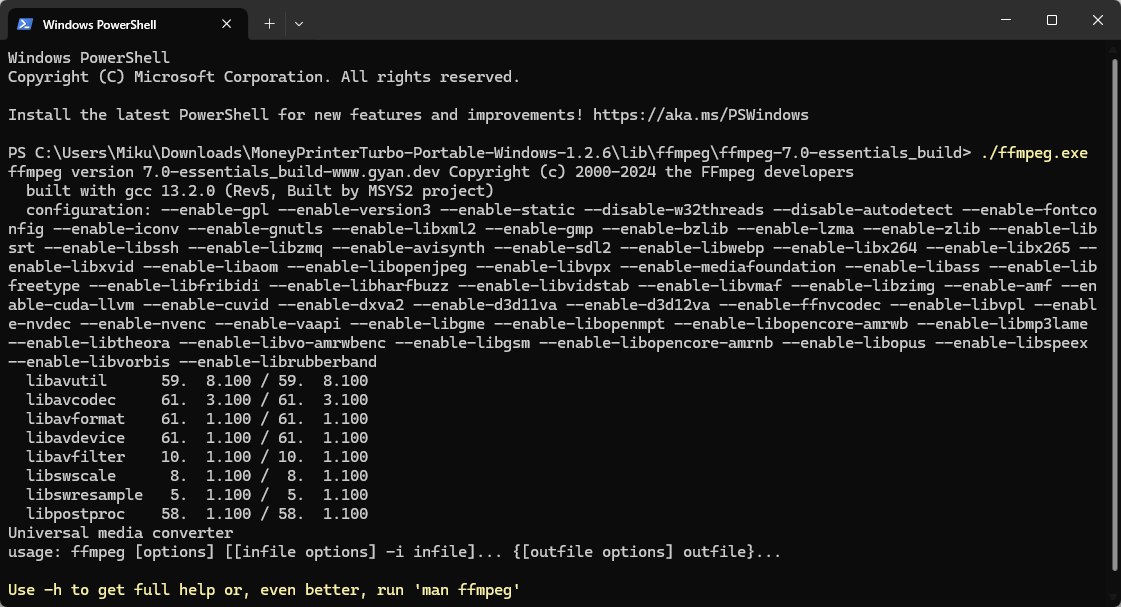
- 如图所示,输出内容中有
--enable-nvenc表示支持 NVIDIA GPU 加速编码
修改编码器
- 打开文件夹
MoneyPrinterTurbo-Portable-Windows-1.2.6\MoneyPrinterTurbo\app\services找到video.py文件
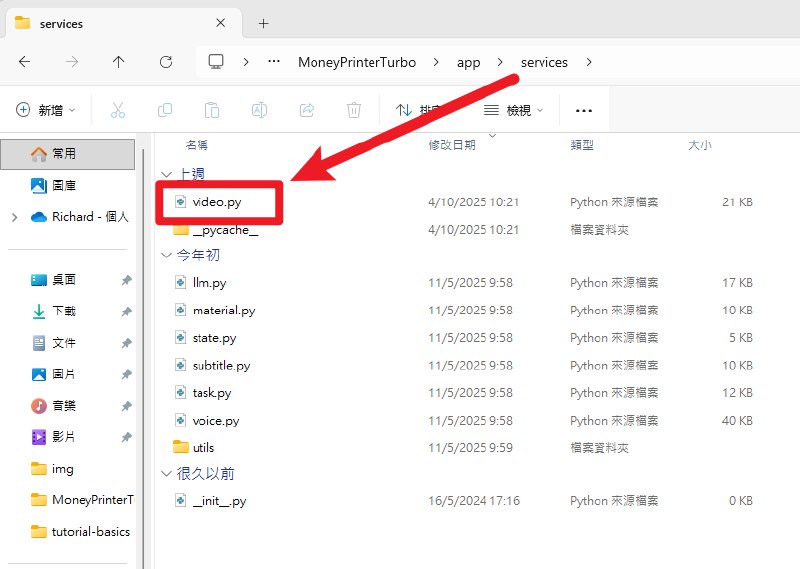
- 使用文本编辑器(推荐 VSCode、Notepad++)打开
video.py文件
这里演示使用记事本打开
-
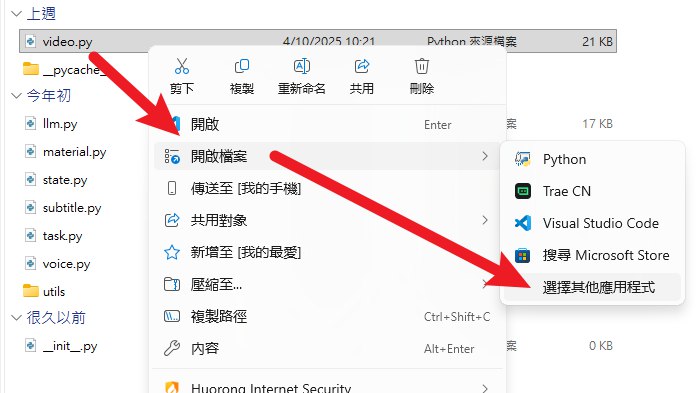
右键单击
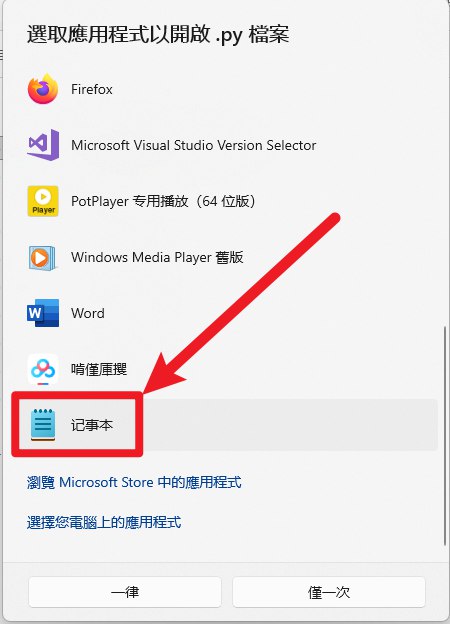
video.py文件,选择 打开方式 -> 记事本 -
如果记事本没有在列表中,选择 选择其他应用 -> 更多应用 -> 在这台电脑上查找其他应用,然后选择
C:\Windows\System32\notepad.exe打开
- 复制以下内容替换
video.py文件
点击展开查看代码
import glob
import itertools
import os
import random
import gc
import shutil
from typing import List
from loguru import logger
from moviepy import (
    AudioFileClip,
    ColorClip,
    CompositeAudioClip,
    CompositeVideoClip,
    ImageClip,
    TextClip,
    VideoFileClip,
    afx,
    concatenate_videoclips,
)
from moviepy.video.tools.subtitles import SubtitlesClip
from PIL import ImageFont

from app.models import const
from app.models.schema import (
    MaterialInfo,
    VideoAspect,
    VideoConcatMode,
    VideoParams,
    VideoTransitionMode,
)
from app.services.utils import video_effects
from app.utils import utils

class SubClippedVideoClip:
    def __init__(self, file_path, start_time=None, end_time=None, width=None, height=None, duration=None):
        self.file_path = file_path
        self.start_time = start_time
        self.end_time = end_time
        self.width = width
        self.height = height
        if duration is None:
            self.duration = end_time - start_time
        else:
            self.duration = duration

    def __str__(self):
        return f"SubClippedVideoClip(file_path={self.file_path}, start_time={self.start_time}, end_time={self.end_time}, duration={self.duration}, width={self.width}, height={self.height})"


audio_codec = "aac"
# video_codec = "libx264"
video_codec = "h264_nvenc"
fps = 30

def close_clip(clip):
    if clip is None:
        return

    try:
        # close main resources
        if hasattr(clip, 'reader') and clip.reader is not None:
            clip.reader.close()

        # close audio resources
        if hasattr(clip, 'audio') and clip.audio is not None:
            if hasattr(clip.audio, 'reader') and clip.audio.reader is not None:
                clip.audio.reader.close()
            del clip.audio

        # close mask resources
        if hasattr(clip, 'mask') and clip.mask is not None:
            if hasattr(clip.mask, 'reader') and clip.mask.reader is not None:
                clip.mask.reader.close()
            del clip.mask

        # handle child clips in composite clips
        if hasattr(clip, 'clips') and clip.clips:
            for child_clip in clip.clips:
                if child_clip is not clip:  # avoid possible circular references
                    close_clip(child_clip)

        # clear clip list
        if hasattr(clip, 'clips'):
            clip.clips = []

    except Exception as e:
        logger.error(f"failed to close clip: {str(e)}")

    del clip
    gc.collect()

def delete_files(files: List[str] | str):
    if isinstance(files, str):
        files = [files]

    for file in files:
        try:
            os.remove(file)
        except:
            pass

def get_bgm_file(bgm_type: str = "random", bgm_file: str = ""):
    if not bgm_type:
        return ""

    if bgm_file and os.path.exists(bgm_file):
        return bgm_file

    if bgm_type == "random":
        suffix = "*.mp3"
        song_dir = utils.song_dir()
        files = glob.glob(os.path.join(song_dir, suffix))
        return random.choice(files)

    return ""


def combine_videos(
    combined_video_path: str,
    video_paths: List[str],
    audio_file: str,
    video_aspect: VideoAspect = VideoAspect.portrait,
    video_concat_mode: VideoConcatMode = VideoConcatMode.random,
    video_transition_mode: VideoTransitionMode = None,
    max_clip_duration: int = 5,
    threads: int = 2,
) -> str:
    audio_clip = AudioFileClip(audio_file)
    audio_duration = audio_clip.duration
    logger.info(f"audio duration: {audio_duration} seconds")
    # Required duration of each clip
    req_dur = audio_duration / len(video_paths)
    req_dur = max_clip_duration
    logger.info(f"maximum clip duration: {req_dur} seconds")
    output_dir = os.path.dirname(combined_video_path)

    aspect = VideoAspect(video_aspect)
    video_width, video_height = aspect.to_resolution()

    processed_clips = []
    subclipped_items = []
    video_duration = 0
    for video_path in video_paths:
        clip = VideoFileClip(video_path)
        clip_duration = clip.duration
        clip_w, clip_h = clip.size
        close_clip(clip)

        start_time = 0

        while start_time < clip_duration:
            end_time = min(start_time + max_clip_duration, clip_duration)
            if clip_duration - start_time >= max_clip_duration:
                subclipped_items.append(SubClippedVideoClip(file_path= video_path, start_time=start_time, end_time=end_time, width=clip_w, height=clip_h))
            start_time = end_time
            if video_concat_mode.value == VideoConcatMode.sequential.value:
                break

    # random subclipped_items order
    if video_concat_mode.value == VideoConcatMode.random.value:
        random.shuffle(subclipped_items)

    logger.debug(f"total subclipped items: {len(subclipped_items)}")

    # Add downloaded clips over and over until the duration of the audio (max_duration) has been reached
    for i, subclipped_item in enumerate(subclipped_items):
        if video_duration > audio_duration:
            break

        logger.debug(f"processing clip {i+1}: {subclipped_item.width}x{subclipped_item.height}, current duration: {video_duration:.2f}s, remaining: {audio_duration - video_duration:.2f}s")

        try:
            clip = VideoFileClip(subclipped_item.file_path).subclipped(subclipped_item.start_time, subclipped_item.end_time)
            clip_duration = clip.duration
            # Not all videos are same size, so we need to resize them
            clip_w, clip_h = clip.size
            if clip_w != video_width or clip_h != video_height:
                clip_ratio = clip.w / clip.h
                video_ratio = video_width / video_height
                logger.debug(f"resizing clip, source: {clip_w}x{clip_h}, ratio: {clip_ratio:.2f}, target: {video_width}x{video_height}, ratio: {video_ratio:.2f}")

                if clip_ratio == video_ratio:
                    clip = clip.resized(new_size=(video_width, video_height))
                else:
                    if clip_ratio > video_ratio:
                        scale_factor = video_width / clip_w
                    else:
                        scale_factor = video_height / clip_h

                    new_width = int(clip_w * scale_factor)
                    new_height = int(clip_h * scale_factor)

                    background = ColorClip(size=(video_width, video_height), color=(0, 0, 0)).with_duration(clip_duration)
                    clip_resized = clip.resized(new_size=(new_width, new_height)).with_position("center")
                    clip = CompositeVideoClip([background, clip_resized])

                    close_clip(clip_resized)
                    close_clip(background)

            shuffle_side = random.choice(["left", "right", "top", "bottom"])
            if video_transition_mode.value == VideoTransitionMode.none.value:
                clip = clip
            elif video_transition_mode.value == VideoTransitionMode.fade_in.value:
                clip = video_effects.fadein_transition(clip, 1)
            elif video_transition_mode.value == VideoTransitionMode.fade_out.value:
                clip = video_effects.fadeout_transition(clip, 1)
            elif video_transition_mode.value == VideoTransitionMode.slide_in.value:
                clip = video_effects.slidein_transition(clip, 1, shuffle_side)
            elif video_transition_mode.value == VideoTransitionMode.slide_out.value:
                clip = video_effects.slideout_transition(clip, 1, shuffle_side)
            elif video_transition_mode.value == VideoTransitionMode.shuffle.value:
                transition_funcs = [
                    lambda c: video_effects.fadein_transition(c, 1),
                    lambda c: video_effects.fadeout_transition(c, 1),
                    lambda c: video_effects.slidein_transition(c, 1, shuffle_side),
                    lambda c: video_effects.slideout_transition(c, 1, shuffle_side),
                ]
                shuffle_transition = random.choice(transition_funcs)
                clip = shuffle_transition(clip)

            if clip.duration > max_clip_duration:
                clip = clip.subclipped(0, max_clip_duration)

            # wirte clip to temp file
            clip_file = f"{output_dir}/temp-clip-{i+1}.mp4"
            clip.write_videofile(clip_file, logger=None, fps=fps, codec=video_codec)

            close_clip(clip)

            processed_clips.append(SubClippedVideoClip(file_path=clip_file, duration=clip.duration, width=clip_w, height=clip_h))
            video_duration += clip.duration

        except Exception as e:
            logger.error(f"failed to process clip: {str(e)}")

    # loop processed clips until the video duration matches or exceeds the audio duration.
    if video_duration < audio_duration:
        logger.warning(f"video duration ({video_duration:.2f}s) is shorter than audio duration ({audio_duration:.2f}s), looping clips to match audio length.")
        base_clips = processed_clips.copy()
        for clip in itertools.cycle(base_clips):
            if video_duration >= audio_duration:
                break
            processed_clips.append(clip)
            video_duration += clip.duration
        logger.info(f"video duration: {video_duration:.2f}s, audio duration: {audio_duration:.2f}s, looped {len(processed_clips)-len(base_clips)} clips")

    # merge video clips progressively, avoid loading all videos at once to avoid memory overflow
    logger.info("starting clip merging process")
    if not processed_clips:
        logger.warning("no clips available for merging")
        return combined_video_path

    # if there is only one clip, use it directly
    if len(processed_clips) == 1:
        logger.info("using single clip directly")
        shutil.copy(processed_clips[0].file_path, combined_video_path)
        delete_files(processed_clips)
        logger.info("video combining completed")
        return combined_video_path

    # create initial video file as base
    base_clip_path = processed_clips[0].file_path
    temp_merged_video = f"{output_dir}/temp-merged-video.mp4"
    temp_merged_next = f"{output_dir}/temp-merged-next.mp4"

    # copy first clip as initial merged video
    shutil.copy(base_clip_path, temp_merged_video)

    # merge remaining video clips one by one
    for i, clip in enumerate(processed_clips[1:], 1):
        logger.info(f"merging clip {i}/{len(processed_clips)-1}, duration: {clip.duration:.2f}s")

        try:
            # load current base video and next clip to merge
            base_clip = VideoFileClip(temp_merged_video)
            next_clip = VideoFileClip(clip.file_path)

            # merge these two clips
            merged_clip = concatenate_videoclips([base_clip, next_clip])

            # save merged result to temp file
            merged_clip.write_videofile(
                filename=temp_merged_next,
                threads=threads,
                logger=None,
                temp_audiofile_path=output_dir,
                audio_codec=audio_codec,
                fps=fps,
                codec=video_codec,
            )
            close_clip(base_clip)
            close_clip(next_clip)
            close_clip(merged_clip)

            # replace base file with new merged file
            delete_files(temp_merged_video)
            os.rename(temp_merged_next, temp_merged_video)

        except Exception as e:
            logger.error(f"failed to merge clip: {str(e)}")
            continue

    # after merging, rename final result to target file name
    os.rename(temp_merged_video, combined_video_path)

    # clean temp files
    clip_files = [clip.file_path for clip in processed_clips]
    delete_files(clip_files)

    logger.info("video combining completed")
    return combined_video_path


def wrap_text(text, max_width, font="Arial", fontsize=60):
    # Create ImageFont
    font = ImageFont.truetype(font, fontsize)

    def get_text_size(inner_text):
        inner_text = inner_text.strip()
        left, top, right, bottom = font.getbbox(inner_text)
        return right - left, bottom - top

    width, height = get_text_size(text)
    if width <= max_width:
        return text, height

    processed = True

    _wrapped_lines_ = []
    words = text.split(" ")
    _txt_ = ""
    for word in words:
        _before = _txt_
        _txt_ += f"{word} "
        _width, _height = get_text_size(_txt_)
        if _width <= max_width:
            continue
        else:
            if _txt_.strip() == word.strip():
                processed = False
                break
            _wrapped_lines_.append(_before)
            _txt_ = f"{word} "
    _wrapped_lines_.append(_txt_)
    if processed:
        _wrapped_lines_ = [line.strip() for line in _wrapped_lines_]
        result = "\n".join(_wrapped_lines_).strip()
        height = len(_wrapped_lines_) * height
        return result, height

    _wrapped_lines_ = []
    chars = list(text)
    _txt_ = ""
    for word in chars:
        _txt_ += word
        _width, _height = get_text_size(_txt_)
        if _width <= max_width:
            continue
        else:
            _wrapped_lines_.append(_txt_)
            _txt_ = ""
    _wrapped_lines_.append(_txt_)
    result = "\n".join(_wrapped_lines_).strip()
    height = len(_wrapped_lines_) * height
    return result, height


def generate_video(
    video_path: str,
    audio_path: str,
    subtitle_path: str,
    output_file: str,
    params: VideoParams,
):
    aspect = VideoAspect(params.video_aspect)
    video_width, video_height = aspect.to_resolution()

    logger.info(f"generating video: {video_width} x {video_height}")
    logger.info(f"  ① video: {video_path}")
    logger.info(f"  ② audio: {audio_path}")
    logger.info(f"  ③ subtitle: {subtitle_path}")
    logger.info(f"  ④ output: {output_file}")

    # https://github.com/harry0703/MoneyPrinterTurbo/issues/217
    # PermissionError: [WinError 32] The process cannot access the file because it is being used by another process: 'final-1.mp4.tempTEMP_MPY_wvf_snd.mp3'
    # write into the same directory as the output file
    output_dir = os.path.dirname(output_file)

    font_path = ""
    if params.subtitle_enabled:
        if not params.font_name:
            params.font_name = "STHeitiMedium.ttc"
        font_path = os.path.join(utils.font_dir(), params.font_name)
        if os.name == "nt":
            font_path = font_path.replace("\\", "/")

        logger.info(f"  ⑤ font: {font_path}")

    def create_text_clip(subtitle_item):
        params.font_size = int(params.font_size)
        params.stroke_width = int(params.stroke_width)
        phrase = subtitle_item[1]
        max_width = video_width * 0.9
        wrapped_txt, txt_height = wrap_text(
            phrase, max_width=max_width, font=font_path, fontsize=params.font_size
        )
        interline = int(params.font_size * 0.25)
        size=(int(max_width), int(txt_height + params.font_size * 0.25 + (interline * (wrapped_txt.count("\n") + 1))))

        _clip = TextClip(
            text=wrapped_txt,
            font=font_path,
            font_size=params.font_size,
            color=params.text_fore_color,
            bg_color=params.text_background_color,
            stroke_color=params.stroke_color,
            stroke_width=params.stroke_width,
            # interline=interline,
            # size=size,
        )
        duration = subtitle_item[0][1] - subtitle_item[0][0]
        _clip = _clip.with_start(subtitle_item[0][0])
        _clip = _clip.with_end(subtitle_item[0][1])
        _clip = _clip.with_duration(duration)
        if params.subtitle_position == "bottom":
            _clip = _clip.with_position(("center", video_height * 0.95 - _clip.h))
        elif params.subtitle_position == "top":
            _clip = _clip.with_position(("center", video_height * 0.05))
        elif params.subtitle_position == "custom":
            # Ensure the subtitle is fully within the screen bounds
            margin = 10  # Additional margin, in pixels
            max_y = video_height - _clip.h - margin
            min_y = margin
            custom_y = (video_height - _clip.h) * (params.custom_position / 100)
            custom_y = max(
                min_y, min(custom_y, max_y)
            )  # Constrain the y value within the valid range
            _clip = _clip.with_position(("center", custom_y))
        else:  # center
            _clip = _clip.with_position(("center", "center"))
        return _clip

    video_clip = VideoFileClip(video_path).without_audio()
    audio_clip = AudioFileClip(audio_path).with_effects(
        [afx.MultiplyVolume(params.voice_volume)]
    )

    def make_textclip(text):
        return TextClip(
            text=text,
            font=font_path,
            font_size=params.font_size,
        )

    if subtitle_path and os.path.exists(subtitle_path):
        sub = SubtitlesClip(
            subtitles=subtitle_path, encoding="utf-8", make_textclip=make_textclip
        )
        text_clips = []
        for item in sub.subtitles:
            clip = create_text_clip(subtitle_item=item)
            text_clips.append(clip)
        video_clip = CompositeVideoClip([video_clip, *text_clips])

    bgm_file = get_bgm_file(bgm_type=params.bgm_type, bgm_file=params.bgm_file)
    if bgm_file:
        try:
            bgm_clip = AudioFileClip(bgm_file).with_effects(
                [
                    afx.MultiplyVolume(params.bgm_volume),
                    afx.AudioFadeOut(3),
                    afx.AudioLoop(duration=video_clip.duration),
                ]
            )
            audio_clip = CompositeAudioClip([audio_clip, bgm_clip])
        except Exception as e:
            logger.error(f"failed to add bgm: {str(e)}")

    video_clip = video_clip.with_audio(audio_clip)
    video_clip.write_videofile(
        output_file,
        audio_codec=audio_codec,
        temp_audiofile_path=output_dir,
        threads=params.n_threads or 2,
        logger=None,
        fps=fps,
        codec=video_codec,
    )
    video_clip.close()
    del video_clip


def preprocess_video(materials: List[MaterialInfo], clip_duration=4):
    for material in materials:
        if not material.url:
            continue

        ext = utils.parse_extension(material.url)
        try:
            clip = VideoFileClip(material.url)
        except Exception:
            clip = ImageClip(material.url)

        width = clip.size[0]
        height = clip.size[1]
        if width < 480 or height < 480:
            logger.warning(f"low resolution material: {width}x{height}, minimum 480x480 required")
            continue

        if ext in const.FILE_TYPE_IMAGES:
            logger.info(f"processing image: {material.url}")
            # Create an image clip and set its duration to 3 seconds
            clip = (
                ImageClip(material.url)
                .with_duration(clip_duration)
                .with_position("center")
            )
            # Apply a zoom effect using the resize method.
            # A lambda function is used to make the zoom effect dynamic over time.
            # The zoom effect starts from the original size and gradually scales up to 120%.
            # t represents the current time, and clip.duration is the total duration of the clip (3 seconds).
            # Note: 1 represents 100% size, so 1.2 represents 120% size.
            zoom_clip = clip.resized(
                lambda t: 1 + (clip_duration * 0.03) * (t / clip.duration)
            )

            # Optionally, create a composite video clip containing the zoomed clip.
            # This is useful when you want to add other elements to the video.
            final_clip = CompositeVideoClip([zoom_clip])

            # Output the video to a file.
            video_file = f"{material.url}.mp4"
            final_clip.write_videofile(video_file, fps=30, logger=None, codec=video_codec)
            close_clip(clip)
            material.url = video_file
            logger.success(f"image processed: {video_file}")
    return materials
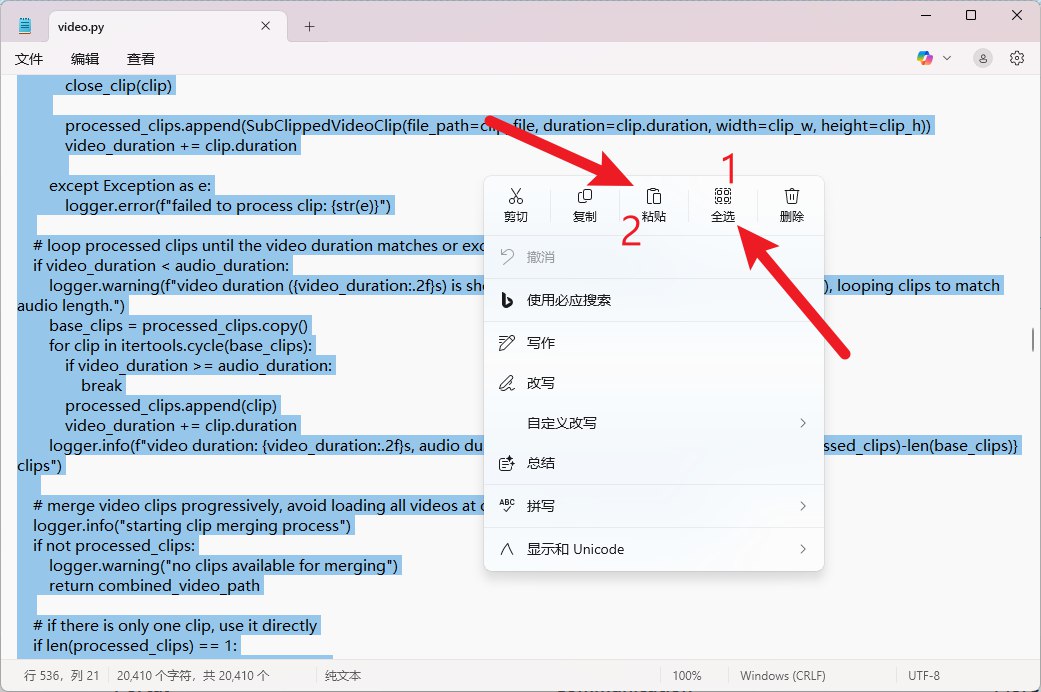
至此,视频编码器已经修改完成,可以使用NVIDIA GPU加速生成视频了
其他品牌 GPU 修改说明
在替换完成的 video.py 中找到以下内容:
video_codec = "h264_nvenc"
将 h264_nvenc 替换为对应品牌 GPU 的编码器名称即可,查询方法请回顾 查看支持的编码器 部分